
Home / Help / G-SOFT Inventory Management System
Topic 11 of 14මාතෘකාව 11 / 14
Add a customer
Add regular and credit customers, so their invoices, payments and statements are kept together — and they can get SMS receipts and reminders.
Step 1 of 1පියවර 1 / 1
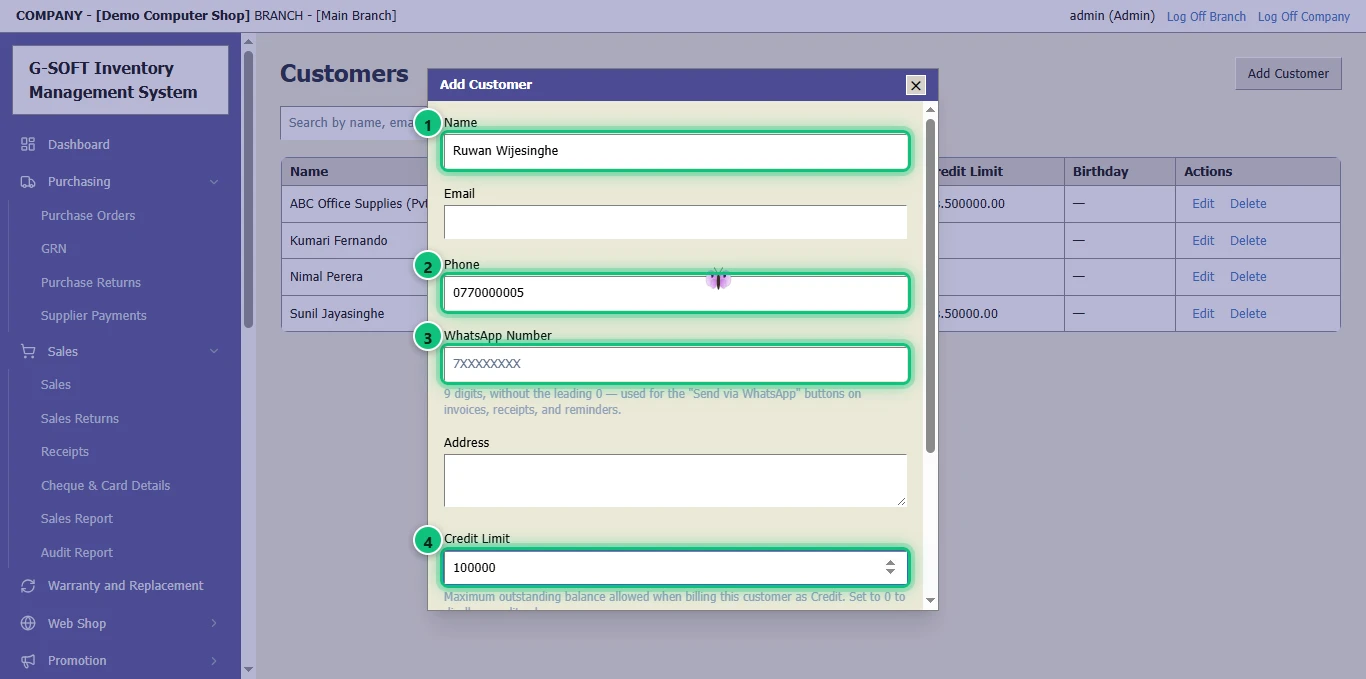
- Open Suppliers and Customer → Customers and click Add Customer.
- Type the Name 1 and Phone 2. Add a WhatsApp number 3 if it is different.
- For a credit customer, set the Credit Limit 4. Birthday and address are optional.
- Click Save 5.
- Suppliers and Customer → Customers විවෘත කර Add Customer ක්ලික් කරන්න.
- Name 1 සහ Phone 2 ඇතුළත් කරන්න. වෙනස් නම් WhatsApp අංකය 3 ද දෙන්න.
- ණය ගනුදෙනුකරුවෙකු නම් Credit Limit 4 දෙන්න. උපන්දිනය සහ ලිපිනය අත්යවශ්ය නැත.
- Save 5 ක්ලික් කරන්න.