
Home / Help / G-SOFT Inventory Management System
Topic 7 of 14මාතෘකාව 7 / 14
Find a serial number (warranty check)
When a customer brings back an item for warranty, find its serial number: who bought it, on which invoice, and when.
Step 1 of 1පියවර 1 / 1
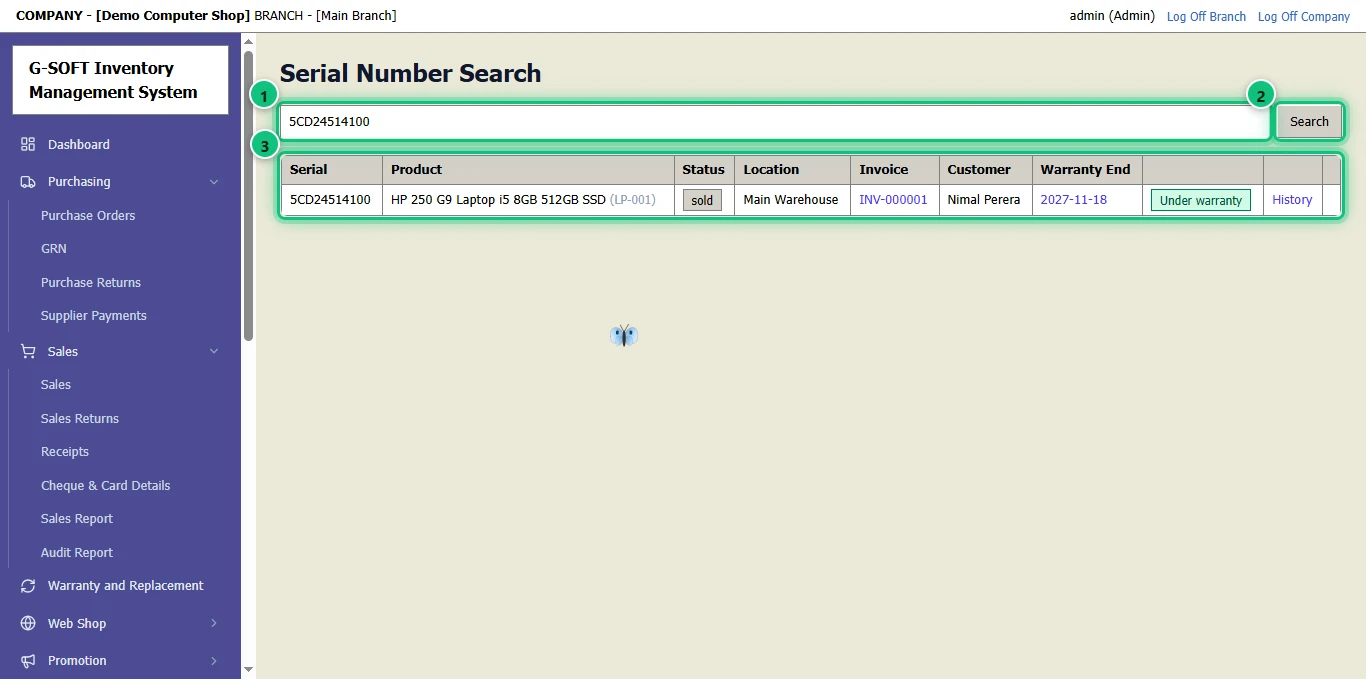
- Open Search → Serials — or press F4 from any screen.
- Scan or type the serial number 1 and click Search 2.
- The result 3 shows the product, its status (in stock / sold), the invoice and the customer, and the warranty.
- Search → Serials විවෘත කරන්න — නැතහොත් ඕනෑම තිරයක සිට F4 ඔබන්න.
- අනුක්රමික අංකය 1 ස්කෑන් කර හෝ ටයිප් කර Search 2 ක්ලික් කරන්න.
- ප්රතිඵලය 3 භාණ්ඩය, එහි තත්ත්වය (තොගයේ / විකුණූ), ඉන්වොයිසිය, ගනුදෙනුකරු සහ වගකීම පෙන්වයි.