
Home / Help / G-SOFT Inventory Manager
Topic 5 of 17මාතෘකාව 5 / 17
Receive stock (GRN)
When goods arrive from a supplier, enter them in a GRN (Goods Received Note). The stock goes up, each batch is kept with its expiry date, and the supplier’s bill is recorded.
Step 1 of 6පියවර 1 / 6
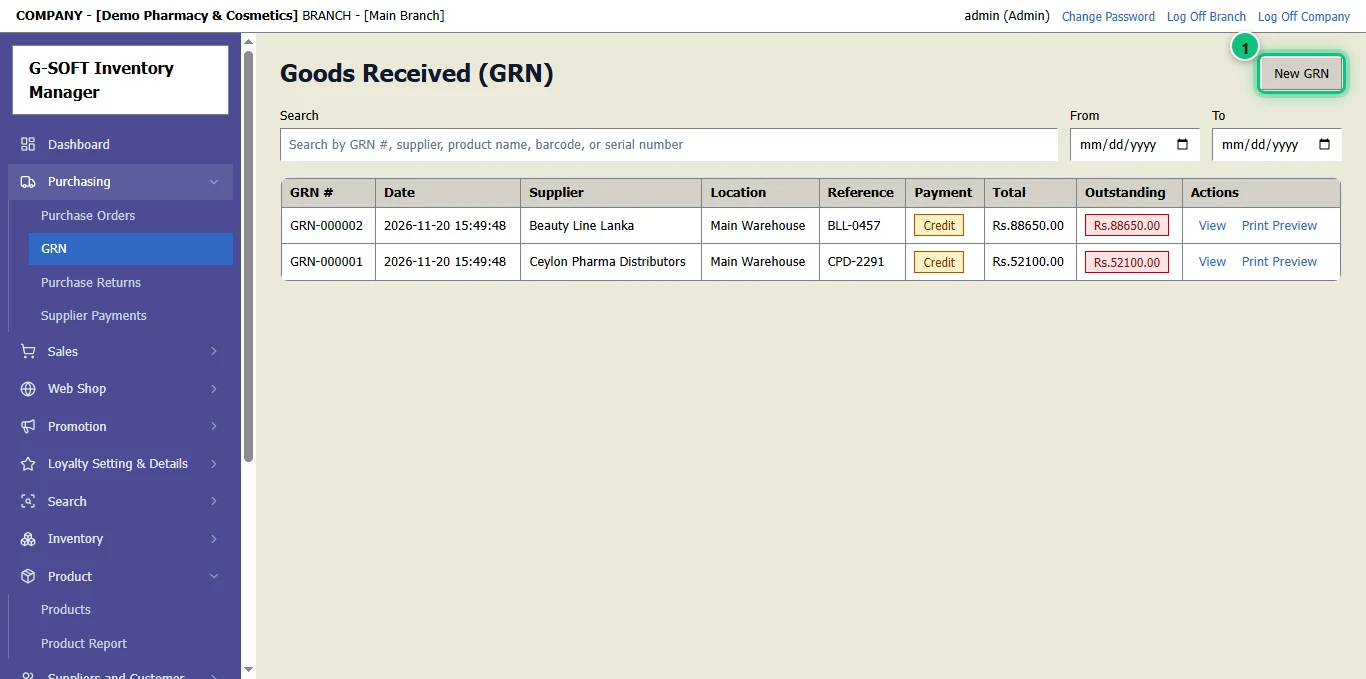
- Open Purchasing → GRN — or press F3 from any screen.
- Click New GRN 1.
- Purchasing → GRN විවෘත කරන්න — නැතහොත් ඕනෑම තිරයක සිට F3 ඔබන්න.
- New GRN 1 ක්ලික් කරන්න.
Step 2 of 6පියවර 2 / 6
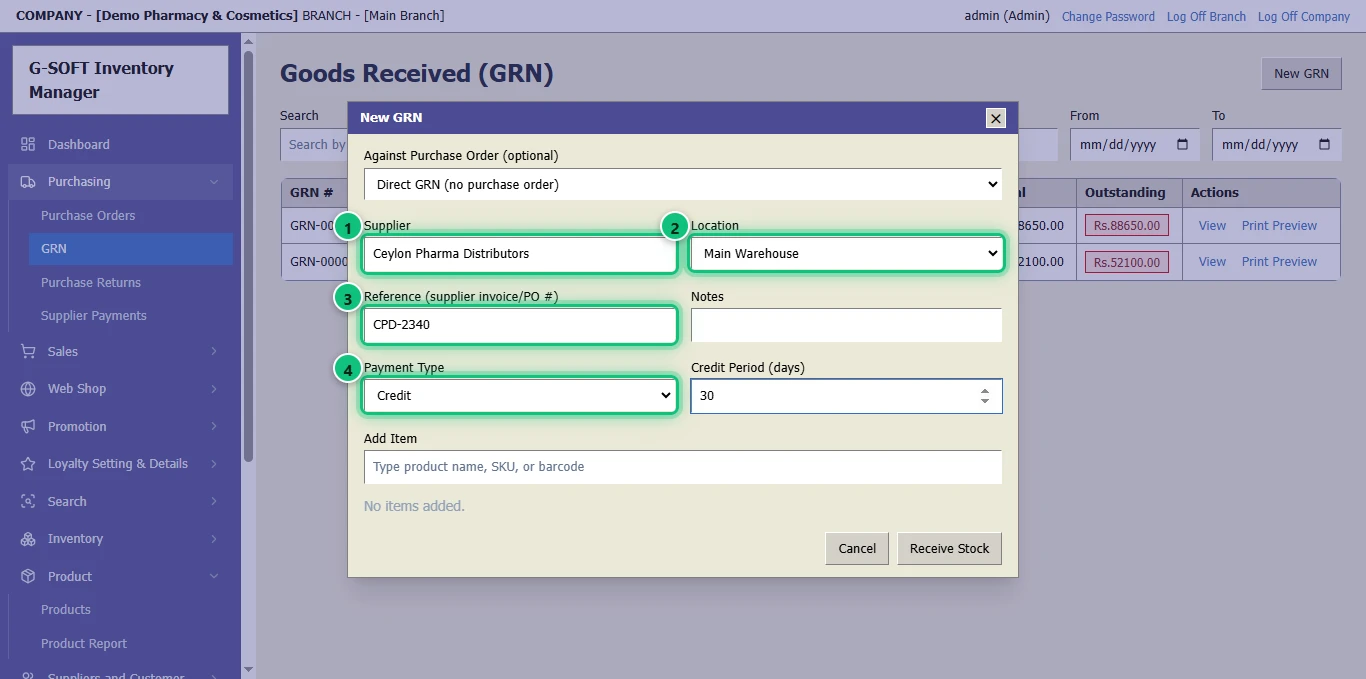
- Choose the Supplier 1: start typing and pick from the list.
- Check the Location 2 the goods go into.
- Type the supplier’s bill number as the Reference 3.
- Choose the Payment Type 4: Cash if you paid now, Credit if you pay later (then set the credit period in days).
- Supplier 1 තෝරන්න: ටයිප් කර ලැයිස්තුවෙන් තෝරන්න.
- භාණ්ඩ යන Location 2 පරීක්ෂා කරන්න.
- සැපයුම්කරුගේ බිල් අංකය Reference 3 ලෙස ඇතුළත් කරන්න.
- Payment Type 4 තෝරන්න: දැන් ගෙව්වා නම් Cash, පසුව ගෙවන්නේ නම් Credit (එවිට ණය කාලය දින ගණනින් දෙන්න).
Step 3 of 6පියවර 3 / 6
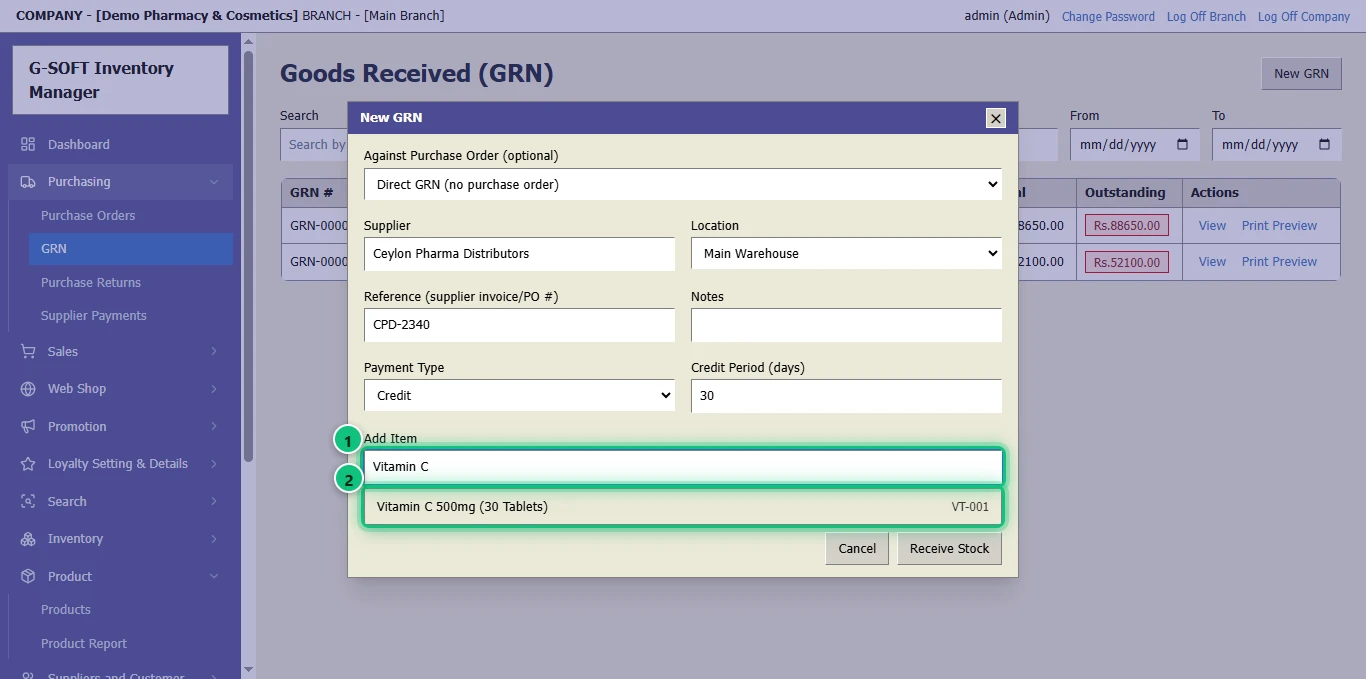
- In Add Item 1, type the product name or SKU, or scan its barcode.
- Click the product in the list 2.
- Add Item 1 හි භාණ්ඩයේ නම හෝ SKU ඇතුළත් කරන්න, නැතහොත් බාකෝඩ් එක ස්කෑන් කරන්න.
- ලැයිස්තුවේ ඇති භාණ්ඩය 2 ක්ලික් කරන්න.
Step 4 of 6පියවර 4 / 6
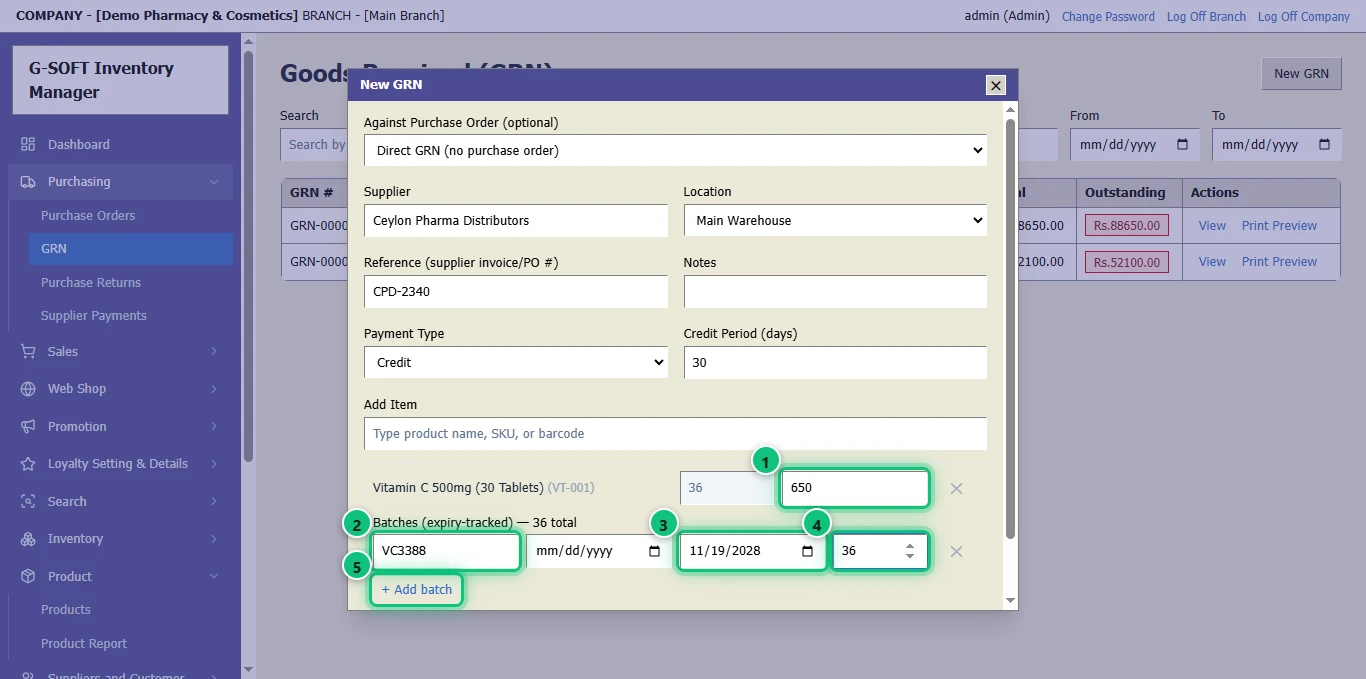
- Check the unit cost 1 on the supplier’s bill.
- For a product with Track batch expiry, fill in its batch: the maker’s batch / lot number 2 from the box (optional), the expiry date 3 and the quantity 4. The product’s quantity is the total of its batches.
- Two expiry dates in one delivery? Click + Add batch 5 and fill in the second one.
- සැපයුම්කරුගේ බිලේ ඒකක මිල 1 පරීක්ෂා කරන්න.
- Track batch expiry ඇති භාණ්ඩයක් නම් එහි බැච් එක පුරවන්න: පෙට්ටියේ ඇති නිෂ්පාදකයාගේ බැච් / ලොට් අංකය 2 (අත්යවශ්ය නැත), කල් ඉකුත් දිනය 3 සහ ප්රමාණය 4. භාණ්ඩයේ ප්රමාණය එහි බැච්වල එකතුවයි.
- එකම තොගයේ කල් ඉකුත් දින දෙකක්ද? + Add batch 5 ක්ලික් කර දෙවැන්න පුරවන්න.
Step 5 of 6පියවර 5 / 6
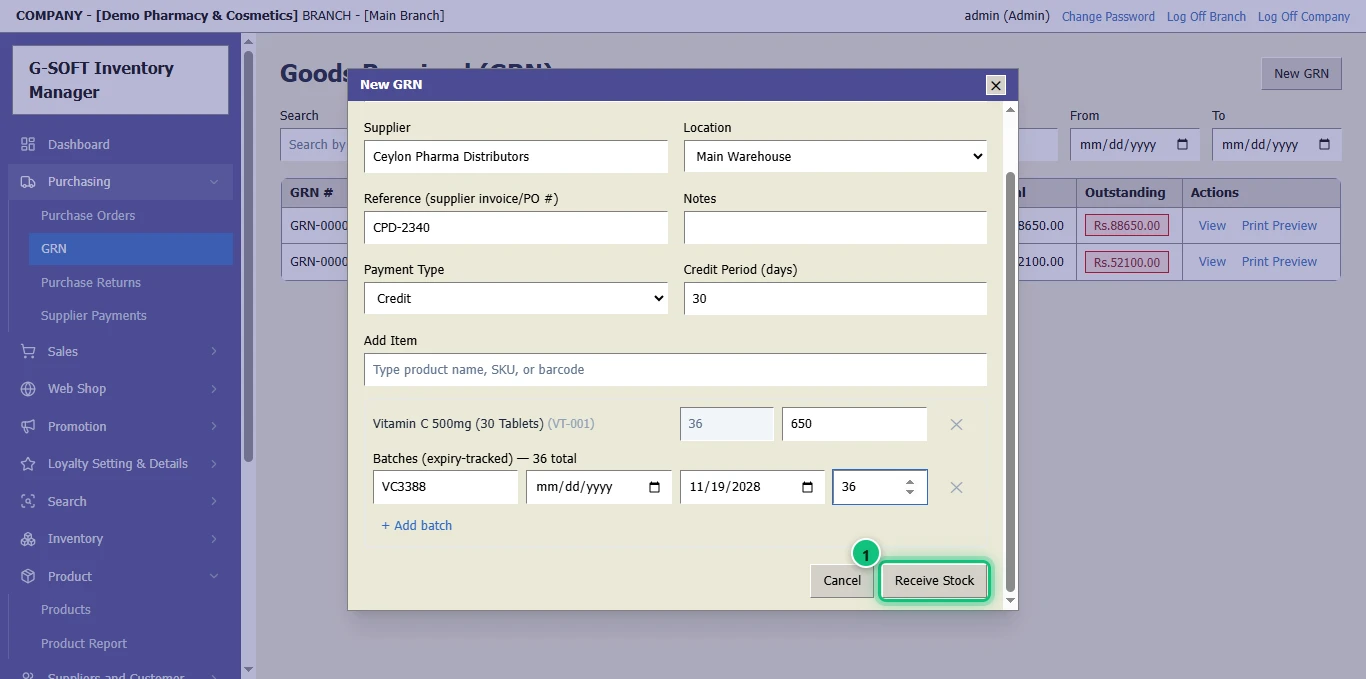
- Add more products the same way, then click Receive Stock 1.
- තවත් භාණ්ඩ එලෙසම එක් කර Receive Stock 1 ක්ලික් කරන්න.
Step 6 of 6පියවර 6 / 6
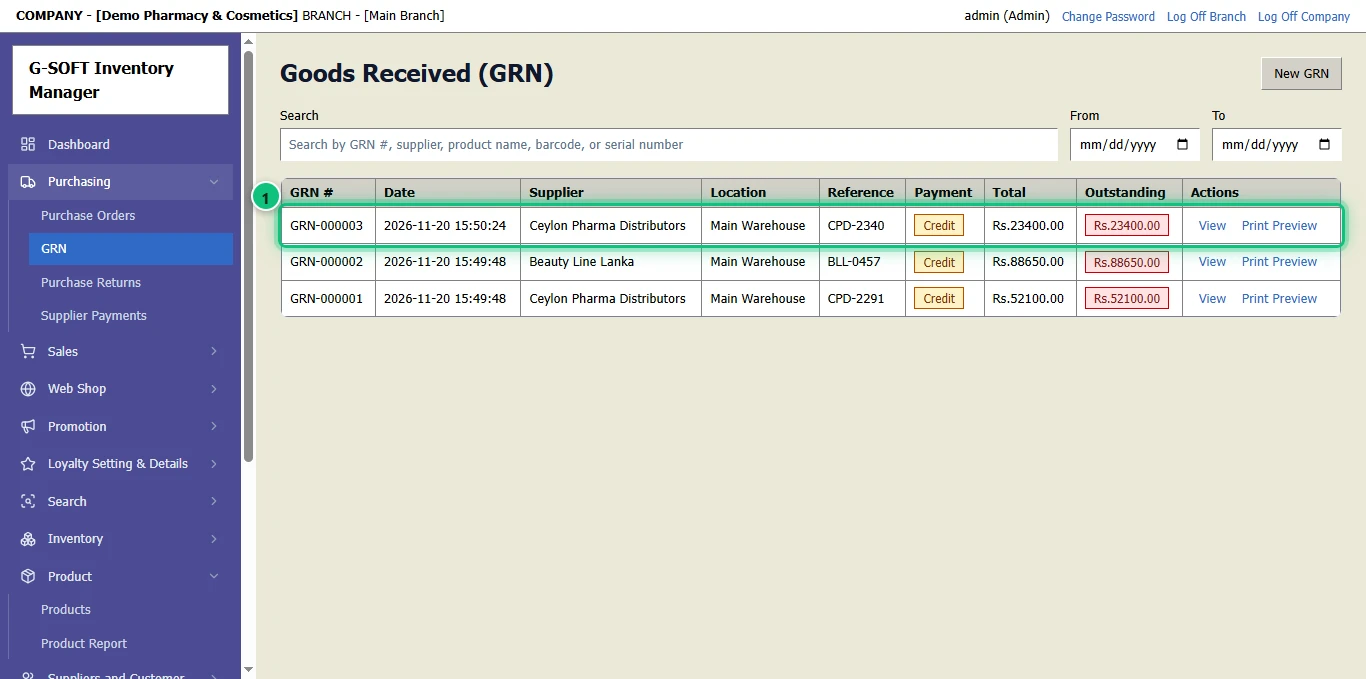
- The GRN is saved 1 and the stock has gone up. View shows it again; Print Preview prints it.
- On credit, it also appears in Purchasing → Supplier Payments until you pay it.
- GRN එක සුරකින ලදී 1, තොගය වැඩි විය. View නැවත පෙන්වයි; Print Preview මුද්රණය කරයි.
- ණයට නම්, ඔබ ගෙවන තුරු එය Purchasing → Supplier Payments හි ද පෙන්වයි.