
Home / Help / G-SOFT Inventory Manager
Topic 2 of 17මාතෘකාව 2 / 17
The main screen
After signing in you see the Dashboard: today's sales, stock, batches about to expire, and the menu that opens every part of the program.
Step 1 of 1පියවර 1 / 1
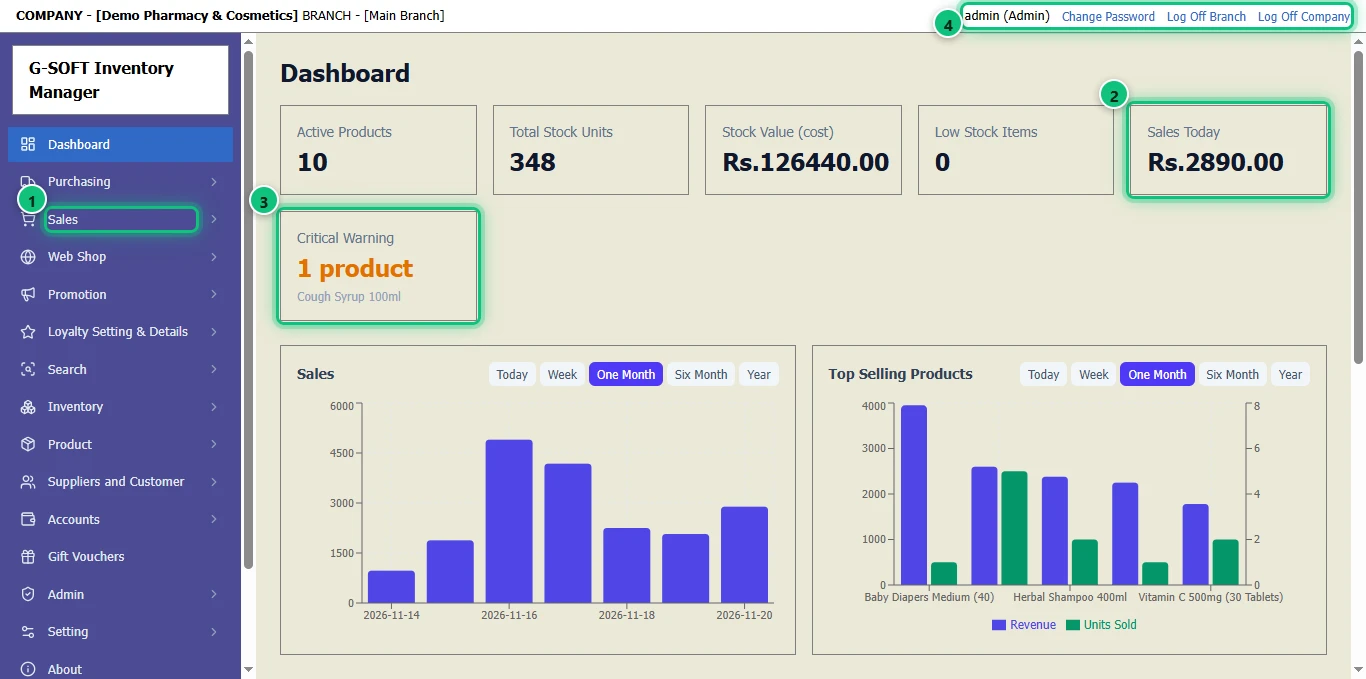
- The menu on the left opens every part of the program. Click a heading — for example Sales 1 — to see its pages.
- The Dashboard shows today’s sales 2, stock value, low-stock items and charts.
- Critical Warning 3 lists products with a batch about to expire — sell or return those first.
- The top bar shows your company, branch and who is signed in 4. Log Off Branch / Log Off Company sign you out.
- Shortcut keys work from any screen: F2 opens a new invoice, F3 a new GRN, F4 opens the cash drawer.
- වම් පැත්තේ මෙනුව වැඩසටහනේ සෑම කොටසක්ම විවෘත කරයි. එහි පිටු බැලීමට ශීර්ෂයක් — උදා: Sales 1 — ක්ලික් කරන්න.
- Dashboard එක අද විකුණුම් 2, තොග වටිනාකම, අඩු තොග සහ ප්රස්ථාර පෙන්වයි.
- Critical Warning 3 කල් ඉකුත් වීමට ආසන්න බැච් ඇති භාණ්ඩ පෙන්වයි — ඒවා මුලින්ම විකුණන්න හෝ ආපසු දෙන්න.
- ඉහළ තීරුව ඔබේ සමාගම, ශාඛාව සහ ඇතුළු වී සිටින පරිශීලකයා 4 පෙන්වයි. Log Off Branch / Log Off Company මගින් ඉවත් වේ.
- කෙටිමං යතුරු ඕනෑම තිරයක සිට ක්රියා කරයි: F2 නව ඉන්වොයිසියක්, F3 නව GRN එකක්, F4 මුදල් ලාච්චුව විවෘත කරයි.