
Home / Help / G-SOFT Channeling Center
Topic 6 of 12මාතෘකාව 6 / 12
Patients and their history
Find a patient by phone, name or NIC and see every visit they made.
Step 1 of 1පියවර 1 / 1
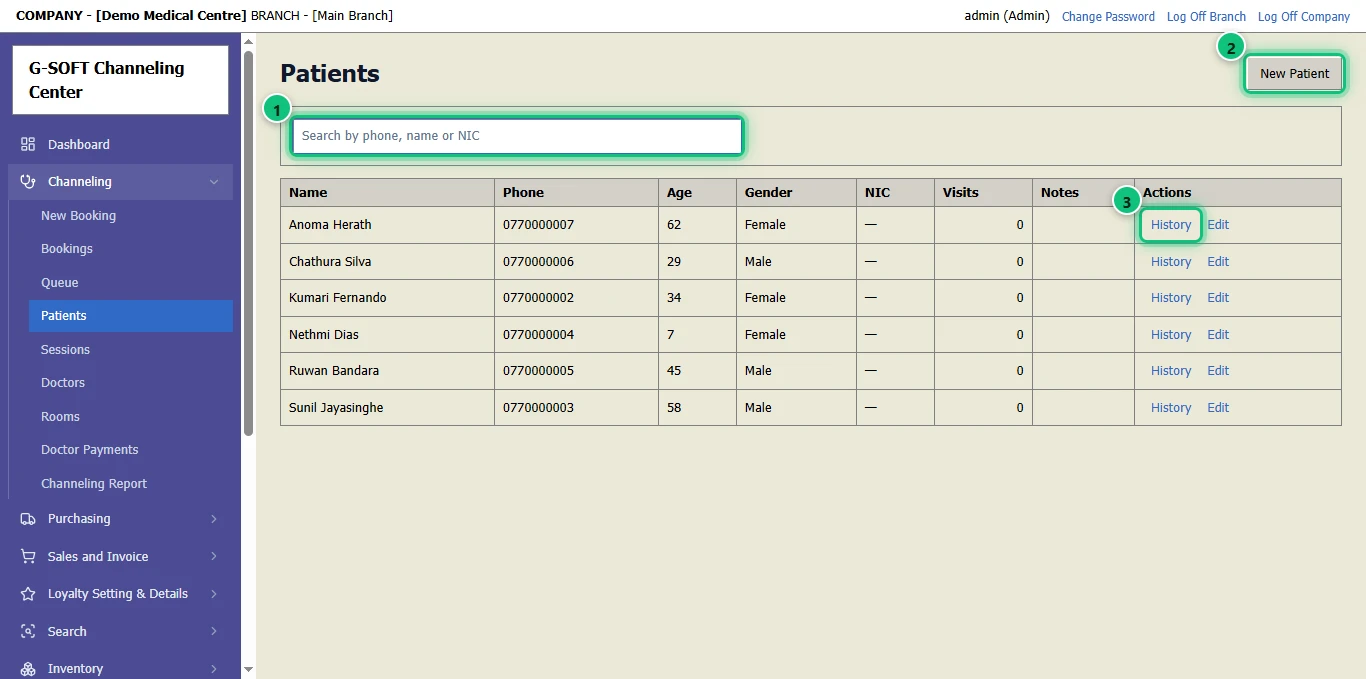
- Open Channeling → Patients. Search by phone, name or NIC 1.
- New Patient 2 registers a patient before booking.
- History 3 shows every booking, doctor and payment of that patient. Edit fixes their details.
- Channeling → Patients විවෘත කරන්න. දුරකථනය, නම හෝ NIC 1 මගින් සොයන්න.
- New Patient 2 වෙන් කිරීමට පෙර රෝගියෙකු ලියාපදිංචි කරයි.
- History 3 එම රෝගියාගේ සෑම වෙන්කිරීමක්ම, වෛද්යවරයා සහ ගෙවීම පෙන්වයි. Edit ඔවුන්ගේ විස්තර නිවැරදි කරයි.