
Home / Help / G-SOFT Channeling Center
Topic 8 of 12මාතෘකාව 8 / 12
Sessions
See every doctor’s sessions, add an extra one, or cancel one and move its patients.
Step 1 of 1පියවර 1 / 1
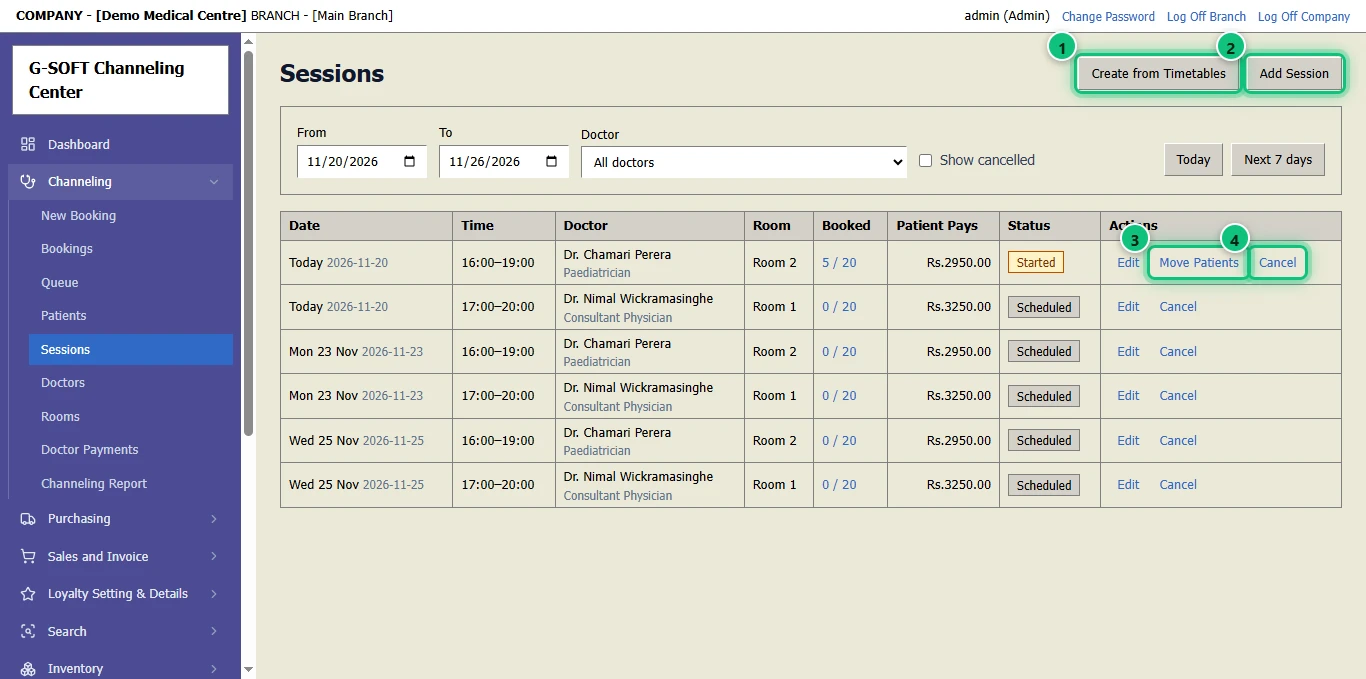
- Open Channeling → Sessions. Sessions are made from the doctors’ timetables for the coming days; Create from Timetables 1 makes them now.
- Add Session 2 adds an extra session on any day.
- Doctor cannot come? Move Patients 3 moves the bookings to another session, and Cancel 4 cancels it — patients can be told by SMS.
- Channeling → Sessions විවෘත කරන්න. ඉදිරි දින සඳහා සැසි වෛද්ය කාලසටහන්වලින් සෑදේ; Create from Timetables 1 ඒවා දැන් සාදයි.
- Add Session 2 ඕනෑම දිනක අමතර සැසියක් එක් කරයි.
- වෛද්යවරයාට පැමිණිය නොහැකිද? Move Patients 3 වෙන්කිරීම් වෙනත් සැසියකට මාරු කරයි, Cancel 4 එය අවලංගු කරයි — රෝගීන්ට SMS මගින් දැනුම් දිය හැක.