
Home / Help / G-SOFT Restaurant Manager
Topic 2 of 15මාතෘකාව 2 / 15
The main screen
After signing in you see the Dashboard: today's sales and charts, and the menu that opens every part of the program.
Step 1 of 1පියවර 1 / 1
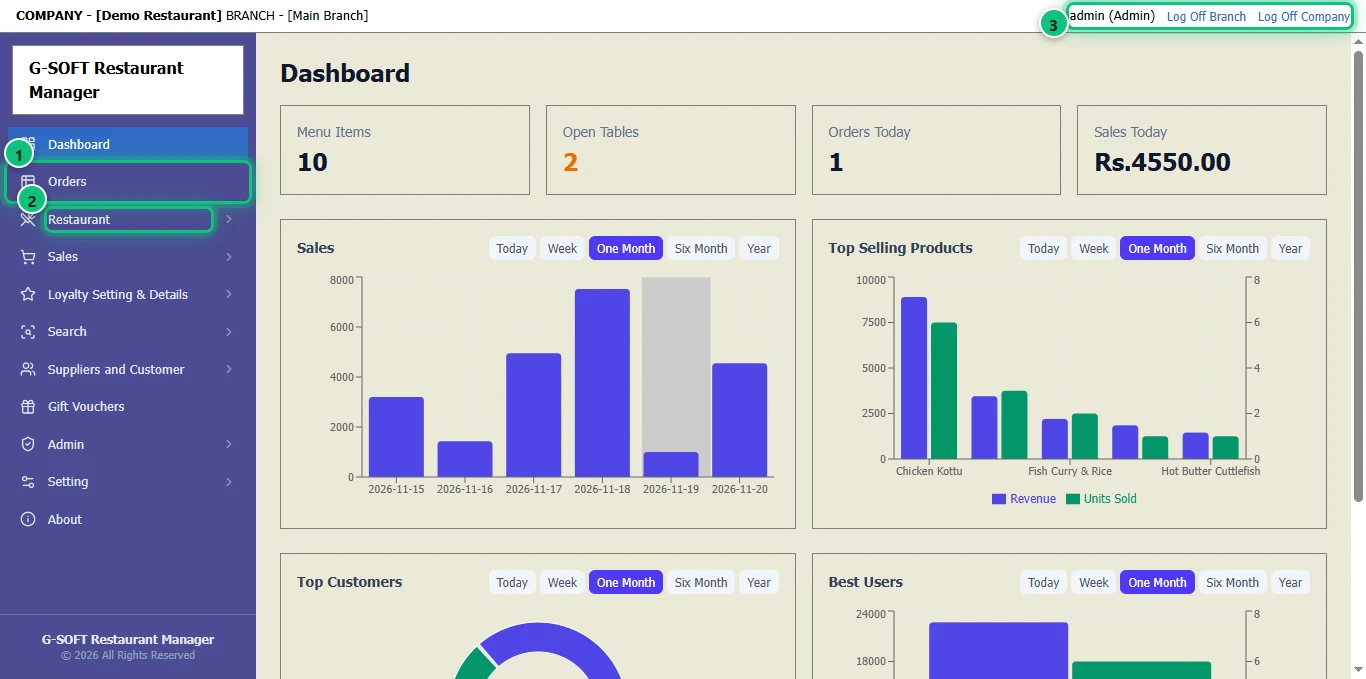
- Orders 1 is the till: every table that is eating now, and new takeaway orders. Press F2 from any screen to open it.
- Restaurant 2 has Tables, Menu Items, Categories, kitchen Printers and Waitstaff.
- The Dashboard shows sales and charts. The top bar shows your company, branch and who is signed in 3.
- Orders 1 යනු ටිල් එකයි: දැන් කන සෑම මේසයක්ම සහ නව takeaway ඇණවුම්. ඕනෑම තිරයක සිට එය විවෘත කිරීමට F2 ඔබන්න.
- Restaurant 2 හි Tables, Menu Items, Categories, මුළුතැන්ගෙයි Printers සහ Waitstaff ඇත.
- Dashboard එක විකුණුම් සහ ප්රස්ථාර පෙන්වයි. ඉහළ තීරුව ඔබේ සමාගම, ශාඛාව සහ ඇතුළු වී සිටින පරිශීලකයා 3 පෙන්වයි.